
常见函数手写
普通函数手写
防抖
防抖函数
- 高频触发
- 耗时操作
- 以最后一次执行为准 (例如回城操作,短时间内点了好几次,也只以最后一次为准)
/**
 * @description 防抖
 * @param {Function} fn 防抖函数
 * @param {Number} delay 延迟时间
 */
function debounce(fn, delay) {
  let timer = null

  // 返回一个函数,要绑定 this,返回普通函数
  return function (...args) {
    // 每次执行函数前都要清除上一次的定时器
    clearTimeout(timer)
    // 需要使用箭头函数处理 this
    timer = setTimeout(() => {
      fn.apply(this, args)
    }, delay)
  }
}节流
节流函数
- 一段时间内只能执行一次
- 可以想象成放技能,技能
CD的时候,不管按多少次,都没用,只有CD好了才会触发
/**
 * @description 节流
 * @param {Function} fn 节流函数
 * @param {Number} delay 延迟时间
 */
function throttle(fn, delay) {
  let lastTime = 0
  return function (...args) {
    const now = Date.now()
    if (now - lastTime >= delay) {
      fn.apply(this, args)
      lastTime = now
    }
  }
}柯里化
柯里化
- 参数复用
- 提前返回
- 延迟执行 (不一次性传入所有参数,而是分多次传入,每次传入部分参数,直到参数集齐后执行函数)
- 类似 收集七颗龙珠,集齐后才能召唤神龙(执行函数)
问题:实现一个 函数,可以实现 fn(1)(2)(3) = 6
// 原函数:需要3个参数
function add(a, b, c) {
  return a + b + c
}

function curry(fn) {
  // 条件1:如果收集的参数数量等于原函数需要的参数数量
  const judge = (...args) => {
    if (args.length === fn.length) {
      // 直接调用 fn
      fn(...args)
    } else {
      // 条件2:参数不足,返回新函数继续收集
      return (...newArgs) => judge(...args, ...newArgs) // 合并已有参数和新参数
    }
  }

  // 返回柯里化后的函数
  return judge
}

const addCurry = curry(add)
console.log(addCurry(1, 2, 3))
console.log(addCurry(1, 2)(3))
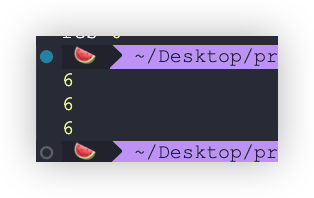
console.log(addCurry(1)(2)(3))可以看到不管怎么调用结果都是 6
call
手写 call 的时候有几点注意事项
- 首先肯定是在函数原型上去写,这样才能让所有函数使用
this的话传null和undefined会指向全局,传原始值就会返回对应的包装类
Function.prototype.myCall = function (context, ...args) {
  // 给 this 指向重新赋值
  context = context == null ? globalThis : Object(context)
}然后解决调用的问题
Function.prototype.myCall = function (context, ...args) {
  // 给 this 指向重新赋值
  context = context == null ? globalThis : Object(context)
}

function method(name) {
  console.log(name)
  console.log('this==>', this)
}

method.myCall({ age: 18 }, '张三')外界是直接 method.myCall 调用,所以myCall 里面的 this 就是 method
Function.prototype.myCall = function (context, ...args) {
  // 给 this 指向重新赋值
  context = context == null ? globalThis : Object(context)

  // 拿到函数 fn,这里的 this 就是 fn,因为是 fn.myCall
  const fn = this
}拿到 fn 后在使用传入 的 context 调用 Fn 就行了
Function.prototype.myCall = function (context, ...args) {
  // 给 this 指向重新赋值
  context = context == null ? globalThis : Object(context)

  // 拿到函数 fn,这里的 this 就是 fn,因为是 fn.myCall
  const fn = this

  // 在使用传入的 this 也就是 context 调用 fn
  const res = context.fn(...args)
  return res
}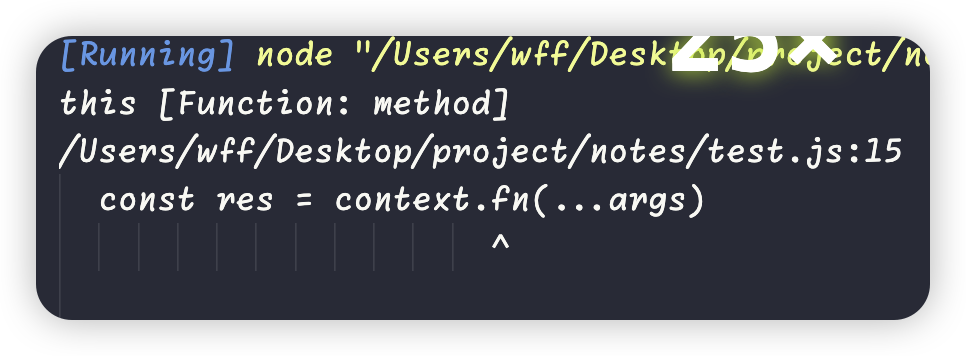
这样运行肯定是报错的。因为此时 context 上面根本就没有 fn,所以需要把 fn 挂载到 context 上,
Function.prototype.myCall = function (context, ...args) {
  // 给 this 指向重新赋值
  context = context == null ? globalThis : Object(context)

  // 拿到函数 fn,这里的 this 就是 fn,因为是 fn.myCall
  const fn = this

  context.fn = fn

  // 在使用传入的 this 也就是 context 调用 fn
  const res = context.fn(...args)
  return res
}

method.myCall({}, '张三')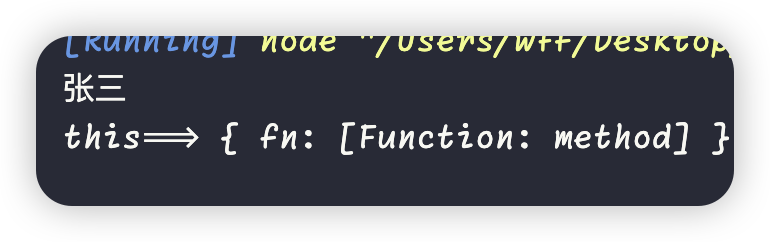
这样做的话虽然调用成功了,但是是有一些隐患的,因为 this 上面明明穿的是空 {},却打印出来了 fn,所以我们应该使用 Object.defineProperty 加 Symbol 来定义 fn,最后拿到函数调用的值后删掉这个符号属性
Function.prototype.myCall = function (context, ...args) {
  // 给 this 指向重新赋值
  context = context == null ? globalThis : Object(context)

  // 拿到函数 fn,这里的 this 就是 fn,因为是 fn.myCall
  const fn = this

  const fnKey = Symbol('fnKey')

  Object.defineProperty(context, fnKey, {
    value: fn,
    // 不可枚举,防止被遍历到
    enumerable: false,
  })

  // 在使用传入的 this 也就是 context 调用 fn
  const res = context[fnKey](...args)

  // 拿到结果后,就可以把临时的符号属性删除
  delete context[fnKey]

  return res
}这样就完整实现了
场景
请求竞态问题
假如我们页面上有两个按钮,这两个按钮是调用同一个函数发送请求,但是他们的参数是不一样的,最终页面上只能展示一个请求的结果,如果我们不对它进行限制,那么就会导致请求竞态问题,假设我们点击按钮1,在按钮1发送的请求没回来的时候,我们又点击按钮2,那么我们很难保证按钮2的请求一定会比按钮1的请求先回来,所以是有可能导致按钮2先回来,那么按钮1的请求结果就会覆盖按钮 2的请求结果,这样就会导致页面上的结果是错误的,所以我们就需要解决这个问题。
const getData = id => {
  const time = id === 1 ? 2000 : 1000
  return new Promise((resolve, reject) => {
    setTimeout(() => {
      resolve(id)
    }, time)
  })
}

getData(1).then(res => {
  console.log(res)
})

getData(2).then(res => {
  console.log(res)
})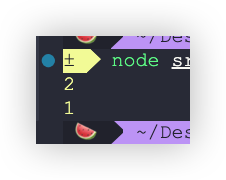
上面这个两次 getData 调用来模拟,我们希望的是最后结果是2,但是由于请求响应的时间是随机的,所以就有可能导致结果是1,这就导致了请求竞态问题。
其实只需要把第一次的 then 取消执行就行了,也就是只执行最后一次的 then 函数。
function createCancelTask(asyncTask) {
  return (...args) => {
    asyncTask(...args)
  }
}

const getData = id => {
  const time = id === 1 ? 2000 : 1000
  return new Promise((resolve, reject) => {
    setTimeout(() => {
      resolve(id)
    }, time)
  })
}

const getDataTask = createCancelTask(getData)

getDataTask(1).then(res => {
  console.log(res)
})

getDataTask(2).then(res => {
  console.log(res)
})function createCancelTask(asyncTask) {
return (...args) => {
// 这里需要返回一个 promise,虽然原函数是promise,
// 但是不好控制。手动返回一个 promise,做状态穿透就行了
return new Promise((resolve, reject) => {
asyncTask(...args).then(
res => resolve(res),
err => reject(err)
)
})
}
}既然这里手动返回的 promise 成功或者失败会走到 asyncTask(...args).then(resolve, reject) then 方法里面,那么只需要把上一次的 resolve 和 reject 置空就行了。也就是执行空函数,就没有影响了。
function createCancelTask(asyncTask) {
  return (...args) => {
    // 这里需要返回一个 promise,虽然原函数是promise,
    // 但是不好控制。手动返回一个 promise,做状态穿透就行了
    return new Promise((resolve, reject) => {
      resolve = reject = () => {}
      asyncTask(...args).then(
        res => resolve(res),
        err => reject(err)
      )
    })
  }
}这样写执行就不会有输出结果了。然后只需要把 resolve = reject = () => {} 保存起来,后面每次调用的时候,都把上一次的 resolve 和 reject 置空就行了。这样当 promise 完成后,执行空函数。
function createCancelTask(asyncTask) {
  // 定义一个空函数
  let cancel = () => {}

  return (...args) => {
    // 这里需要返回一个 promise,虽然原函数是promise,
    // 但是不好控制。手动返回一个 promise,做状态穿透就行了
    return new Promise((resolve, reject) => {
      // 将空函数赋值
      cancel = () => {
        resolve = reject = () => {}
      }

      asyncTask(...args).then(
        res => resolve(res),
        err => reject(err)
      )
    })
  }
}但是有个问题,这个 cancel 函数 什么时候调用呢,其实就是下一次执行的时候就调用,
function createCancelTask(asyncTask) {
  // 定义一个空函数
  let cancel = () => {}

  return (...args) => {
    // 这里需要返回一个 promise,虽然原函数是promise,
    // 但是不好控制。手动返回一个 promise,做状态穿透就行了
    return new Promise((resolve, reject) => {
      // 下一次执行的时候就调用,(第一次调用是空函数,无所谓)
      cancel()

      // 将空函数赋值
      cancel = () => {
        resolve = reject = () => {}
      }

      asyncTask(...args).then(
        res => resolve(res),
        err => reject(err)
      )
    })
  }
}// 最终版
const NOOP = () => {}
function createCancelTask(asyncTask) {
// 定义一个空函数
let cancel = NOOP
return (...args) => {
// 这里需要返回一个 promise,虽然原函数是promise,
// 但是不好控制。手动返回一个 promise,做状态穿透就行了
return new Promise((resolve, reject) => {
// 下一次执行的时候就调用,(第一次调用是空函数,无所谓)
cancel()
// 将空函数赋值
cancel = () => {
resolve = reject = NOOP
}
asyncTask(...args).then(
res => resolve(res),
err => reject(err)
)
})
}
}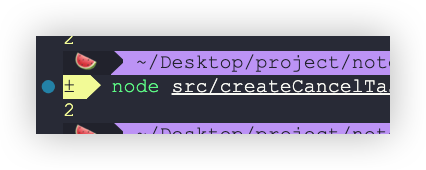
这样的话就只有第二次的请求结果了,也就解决了请求竞态的问题。 也就是修改了运行时的函数体
分时函数的封装
当有长任务要执行的时候,导致渲染帧被迫延后了,就没办法进行渲染了,所以看上去会有卡顿现象。
举例:
点击按钮的时候,创建 100000 个 div,
const tasks = Array.from({ length: 100000 }, (_, i) => () => {
  const div = document.createElement('div')
  div.textContent = i
  document.body.appendChild(div)
})

btn2.onclick = () => {
  console.log('开始执行任务')
  for (const task of tasks) {
    task()
  }
}解决: 不能一次性将任务全部执行完,而是应该分步去执行。
渲染帧,每一帧有很多事情做,可能是渲染,执行js,处理事件回调,总之有很多事情要做,做完这些事情过后呢,可能还剩余一部分时间,这一帧16.6ms还没到,这部分时间就是空闲时间,在这一段时间去做处理,不会影响到渲染,别占用太久就行,把这个空闲时间用完,空闲时间可以通过 requestIdleCallback 回调函数来获取。 当有空余时间的时候,就会执行这个回调
封装一个 函数 performTask
const tasks = Array.from({ length: 100000 }, (_, i) => () => {
  const div = document.createElement('div')
  div.textContent = i
  document.body.appendChild(div)
})

btn.onclick = () => {
  performTask(tasks)
}

// 分步执行任务
function performTask(tasks) {
  // 渲染帧空闲时间回调
  requestIdleCallback(() => {
    while (当前还有任务要执行 && 这一帧还有空闲时间可用) {
      执行一个任务
    }
  })
}这样的话一步的执行量就完成了,还得启动下一步的执行。
// 分步执行任务
function performTask(tasks) {
  // 渲染帧空闲时间回调
  const _run = () => {
    requestIdleCallback(() => {
      while (当前还有任务要执行 && 这一帧还有空闲时间可用) {
        执行一个任务
      }
      // 当 while 循环结束后,说明当前帧没有空闲时间了,或者任务已经执行完了
      if (当前还有任务要执行) {
        // 继续注册下一步任务事件,重复的调用 _run
        _run()
      }
    })
  }

  _run()
}这样的话程序的整体结构就写出来了,然后实现代码就行了
function performTask(tasks) {
  // 记录当前执行任务的下标
  let index = 0
  // 渲染帧空闲时间回调
  const _run = () => {
    requestIdleCallback(idle => {
      while (index < tasks.length && idle.timeRemaining() > 0) {
        tasks[index++]()
      }
      // 当 while 循环结束后,说明当前帧没有空闲时间了,或者任务已经执行完了
      if (index < tasks.length) {
        // 继续注册下一步任务事件,重复的调用 _run
        _run()
      }
    })
  }

  _run()
}这样就完成了在 requestIdleCallback 回调函数中去处理这些小任务的处理。接下来可以把这个场景封装成一个通用的场景,比如可以让用户自己决定调用的次数,什么时候调用,调用什么分片任务。
/**
 *
 * @param {Number} executorNum 执行任务的次数
 * @param {Function} taskHandler 执行什么任务
 * @param {Function | undefined} scheduler 调度器,默认为 requestIdleCallback
 */
function performTask(executorNum, taskHandler, scheduler) {
  if (scheduler === undefined) {
    // 默认的调度器
    scheduler = isGoOn => {
      requestIdleCallback(idle => {
        isGoOn(() => idle.timeRemaining() > 0)
      })
    }
  }

  // 记录当前执行任务的下标
  let index = 0
  // 渲染帧空闲时间回调
  const _run = () => {
    scheduler(isGoOn => {
      while (index < executorNum && isGoOn()) {
        // 满足条件,执行任务
        taskHandler(index++)
      }
      // 当 while 循环结束后,说明当前帧没有空闲时间了,或者任务已经执行完了
      if (index < executorNum) {
        // 继续注册下一步任务事件,重复的调用 _run
        _run()
      }
    })
  }

  _run()
}这样就可以这样调用了
btn.onclick = () => {
  console.log('开始执行任务')

  const scheduler = isGoOn => {
    let count = 0
    setTimeout(() => {
      isGoOn(() => count++ < 3)
    }, 1000)
  }

  const taskHandler = index => {
    const div = document.createElement('div')
    div.textContent = index
    document.body.appendChild(div)
  }

  // 不传就是 requestIdleCallback
  performTask(100000, taskHandler)
}异步相关问题
异步函数延迟执行工具
有的时候需要将异步函数延迟执行,但是又不能修改原函数的代码,这个时候就可以使用这个工具函数了,实现也很简单,只需要返回一个 promise,然后将原函数的状态通过 promise 穿透就行了。
function delayAsync(fn, delay) {
  return function (...args) {
    return new Promise((resolve, reject) => {
      setTimeout(async () => {
        try {
          const result = await fn.apply(this, args)
          resolve(result)
        } catch (error) {
          reject(error)
        }
      }, delay)
    })
  }
}使用示例:
// 使用示例
const asyncFn = async name => {
  return `Hello, ${name}!`
  // return Promise.reject('error')
}

const delayedAsyncFn = delayAsync(asyncFn, 2000)

delayedAsyncFn('World')
  .then(result => {
    console.log(result) // 2秒后输出: Hello, World!
  })
  .catch(error => {
    console.log('error', error)
  })